Thursday, July 12, 2018

How DHCP server dynamically assigns IP address to a host?

              DHCP is an abbreviation for Dynamic Host Configuration Protocol. It is an application layer protocol used by hosts for obtaining network setup information. The DHCP is controlled by DHCP server that dynamically distributes network configuration parameters such as IP addresses, subnet mask and gateway address.
What is Dynamic host configuration protocol?
  • Dynamic – Automatically
  • Host – Any computer that is connected to the network
  • Configuration – To configure a host means to provide network information(ip address,subnet mask,Gateway address) to a host
  • Protocol – Set of rules
Summing up, a DHCP server dynamically configures a host in a network.
           Disadvantage of manually Configuring the host: Configuring a host when it is connected to the network can be done either manually i.e., by the network administrator or by the DHCP server. In case of home networks, manual configuration is quite easy. Whereas in the large networks, the network administrator might face many problems.
Also, the manual configuration is prone to mistakes. Say a Network administrator might assign an IP address which was already assigned. Thus, causing difficulty for both administrator as well as neighbors on network.
So, here comes the use of DHCP server. Before discussing about how DHCP server works, lets go through the DHCP entities.
Configuring a host using DHCP
To configure a host, we require the following things:
  • Leased IP address – IP address to a host which lasts for a particular duration which goes for a few hours,few days or few weeks.
  • Subnet Mask – The host can know on which network it is on.
  • Gateway address – The Gateway is the Internet Service Provider that connects user to the internet.The Gateway address lets the host know where the gateway is to connect to the internet.
DHCP Entities
  • DHCP server: It automatically provides network information(IPaddress, subnet mask, gateway address) on lease. Once the duration is expired, that network information can be assigned to other machine.  It also maintains the data storage which stores the available IP addresses.
  • DHCP client: Any node which request an IP address allocation to a network is considered as DHCP client.
  • DHCP Relay Agent: In case, we have only one DHCP server for multiple LAN’s then this Agent which presents in every network forwards the DHCP request to DHCP server. So, using DHCP Relay Agent we can configure multiple LAN’s with single server.
How DHCP server assigns IP address to a host?
  1. DHCPDISCOVER: When a new node is connected to the network, it broadcasts the DHCPDISCOVER message which contains the source address as 0.0.0.0 to every node on the network including server. DHCP server on receiving the message, returns the DHCPOFFER message to the requested host which contains the server address and new IP address to the node.
  2. DHCPOFFER: If there are multiple servers on the network, host receives multiple DHCPOFFER messages. It is up to the host to select a particular message.
  3. DHCPREQUEST:  The requested host on receiving the offer message, it again broadcasts the DHCPREQUEST message on the network with the address of the server whose offer message is accepted by the host. The server which pertains to that server address sent by the host checks whether the address to be assigned to the node is available in the data storage.
  4. DHCPACK : If the address is assigned , it marks the IP address in the storage as unavailable to ensure consistency. Now, the server sends DHCPACK packet to the requested host which contains network information(IP address, subnet mask, gateway address). In case, if the address is assigned to other machine meanwhile, then the server sends the packet DHCPNAK to the requested host indicating that the IP address is assigned to some other machine.
  5. DHCP RELEASE : And finally, If the host wants to move to other network or if it has finished  its work, it sends the DHCP RELEASE packet to the server indicating that it wants to disconnect. Then the server marks the IP address as available in the storage so that it can be assigned to other machine.

DNS (Domain Name Server)

        DNS is a host name to IP address translation service. DNS is a distributed database implemented in a hierarchy of name servers. It is an application layer protocol for message exchange between clients and servers.
Requirement
Every host is identified by the IP address but remembering numbers is very difficult for the people and also the IP addresses are not static therefore a mapping is required to change the domain name to IP address. So DNS is used to convert the domain name of the websites to their numerical IP address.
Domain :
There are various kinds of DOMAIN :
  1. Generic domain : .com(commercial) .edu(educational) .mil(military) .org(non profit organization) .net(similar to commercial) all these are generic domain.
  2. Country domain .in (india) .us .uk
  3. Inverse domain if we want to know what is the domain name of the website. Ip to domain name mapping.So DNS can provide both the mapping for example to find the ip addresses of geeksforgeeks.org then we have to type nslookup www.geeksforgeeks.org.
Organization of Domain
DNS
It is Very difficult to find out the ip address associated to a website because there are millions of websites and with all those websites we should be able to generate the ip address immediately,
there should not be a lot of delay for that to happen organization of database is very important.
DNS record – Domain name, ip address what is the validity?? what is the time to live ?? and all the information related to that domain name. These records are stored in tree like structure.


Namespace – Set of possible names, flat or hierarchical . Naming system maintains a collection of bindings of names to values – given a name, a resolution mechanism returns the corresponding value –
Name server – It is an implementation of the resolution mechanism.. DNS (Domain Name System) = Name service in Internet – Zone is an administrative unit, domain is a subtree.

Name to Address Resolution
DNS_2
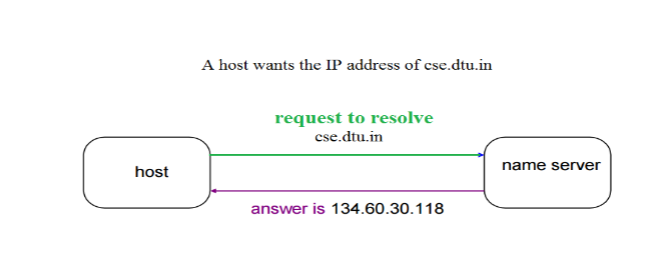
The host request the DNS name server to resolve the domain name. And the name server returns the IP address corresponding to that domain name to the host so that the host can future connect to that IP address.

Hierarchy of Name Servers
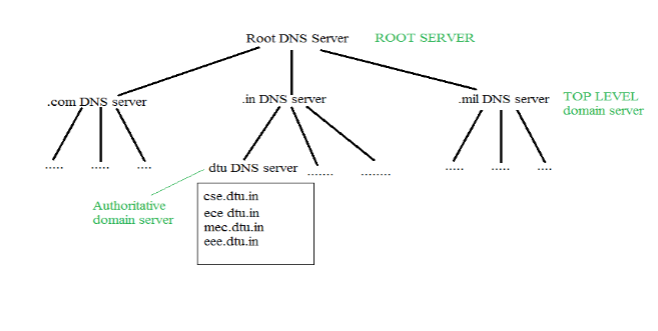
Root name servers – It is contacted by name servers that can not resolve the name. It contacts authoritative name server if name mapping is not known. It then gets the mapping and return the IP address to the host.
Top level server – It is responsible for com, org, edu etc and all top level country domains like uk, fr, ca, in etc. They have info about authoritative domain servers and know names and IP addresses of each authoritative name server for the second level domains.
Authoritative name servers This is organization’s DNS server, providing authoritative hostName to IP mapping for organization servers. It can be maintained by organization or service provider. In order to reach cse.dtu.in we have to ask the root DNS server, then it will point out to the top level domain server and then to authoritative domain name server which actually contains the IP address. So the authoritative domain server will return the associative ip address.

Domain Name Server
DNS_3
The client machine sends a request to the local name server, which , if root does not find the address in its database, sends a request to the root name server , which in turn, will route the query to an intermediate or authoritative name server. The root name server can also contain some host Name to IP address mappings . The intermediate name server always knows who the authoritative name server is. So finally the IP address is returned to the local name server which in turn returns the IP address to the host.

Why does DNS use UDP and not TCP?

        DNS is an application layer protocol. All application layer protocols use one of the two transport layer protocols, UDP and TCP. TCP is reliable and UDP is not reliable. DNS is supposed to be reliable, but it uses UDP, why?

            There are following interesting facts about TCP and UDP on transport layer that justify the above.
1) UDP is much faster. TCP is slow as it requires 3 way handshake. The load on DNS servers is       also an important factor. DNS servers (since they use UDP) don’t have keep connections.
2) DNS requests are generally very small and fit well within UDP segments.
2) UDP is not reliable, but reliability can added on application layer. An application can use UDP      and can be reliable by using timeout and resend at application layer.

Transmission Modes in Computer Networks (Simplex, Half-Duplex and Full-Duplex)

               Transmission mode means transferring of data between two devices. It is also known as communication mode. Buses and networks are designed to allow communication to occur between individual devices that are interconnected. There are three types of transmission mode:-
  • Simplex Mode
  • Half-Duplex Mode
  • Full-Duplex Mode


  • Simplex Mode
    In Simplex mode, the communication is unidirectional, as on a one-way street. Only one of the two devices on a link can transmit, the other can only receive. The simplex mode can use the entire capacity of the channel to send data in one direction.
    Example: Keyboard and traditional monitors. The keyboard can only introduce input, the monitor can only give the output.


    Half-Duplex Mode
    In half-duplex mode, each station can both transmit and receive, but not at the same time. When one device is sending, the other can only receive, and vice versa. The half-duplex mode is used in cases where there is no need for communication in both direction at the same time. The entire capacity of the channel can be utilized for each direction.
    Example: Walkie- talkie in which message is sent one at a time and messages are sent in both the directions.


    Full-Duplex Mode
    In full-duplex mode, both stations can transmit and receive simultaneously. In full_duplex mode, signals going in one direction share the capacity of the link with signals going in other direction, this sharing can occur in two ways:
  • Either the link must contain two physically separate transmission paths, one for sending and other for receiving.
  • Or the capacity is divided between signals travelling in both directions.
  • Full-duplex mode is used when communication in both direction is required all the time. The capacity of the channel, however must be divided between the two directions.
    Example: Telephone Network in which there is communication between two persons by a telephone line, through which both can talk and listen at the same time.

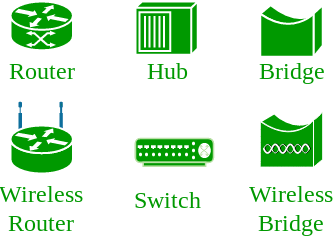
    Network Devices (Hub, Repeater, Bridge, Switch, Router, Gateways and Brouter)

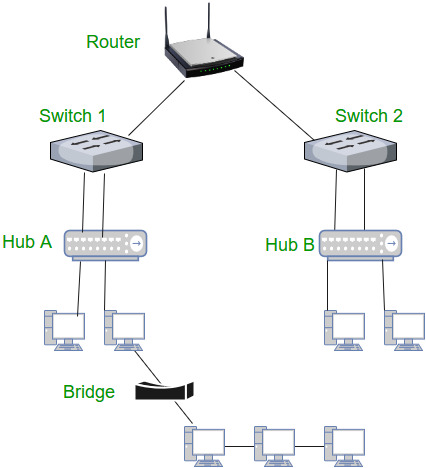
    1. Repeater – A repeater operates at the physical layer. Its job is to regenerate the signal over the same network before the signal becomes too weak or corrupted so as to extend the length to which the signal can be transmitted over the same network. An important point to be noted about repeaters is that they do not amplify the signal. When the signal becomes weak, they copy the signal bit by bit and regenerate it at the original strength. It is a 2 port device.

    2. Hub –  A hub is basically a multiport repeater. A hub connects multiple wires coming from different branches, for example, the connector in star topology which connects different stations. Hubs cannot filter data, so data packets are sent to all connected devices.  In other words, collision domain of all hosts connected through Hub remains one.  Also, they do not have intelligence to find out best path for data packets which leads to inefficiencies and wastage.
    Types of Hub
    • Active Hub :- These are the hubs which have their own power supply and can clean , boost and relay the signal along the network. It serves both as a repeater as well as wiring center. These are used to extend maximum distance between nodes.
    • Passive Hub :- These are the hubs which collect wiring from nodes and power supply from active hub. These hubs relay signals onto the network without cleaning and boosting them and can’t be used to extend distance between nodes.

    3. Bridge – A bridge operates at data link layer. A bridge is a repeater, with add on functionality of filtering content by reading the MAC addresses of source and destination. It is also used for interconnecting two LANs working on the same protocol. It has a single input and single output port, thus making it a 2 port device.
    Types of Bridges
    • Transparent Bridges :- These are the bridge in which the stations are completely unaware of the
      bridge’s existence i.e. whether or not a bridge is added or deleted from the network , reconfiguration of
      the stations is unnecessary. These bridges makes use of two processes i.e. bridge forwarding and bridge learning.
    • Source Routing Bridges :- In these bridges, routing operation is performed by source station and the frame specifies which route to follow. The hot can discover frame by sending a specical frame called discovery frame, which spreads through the entire network using all possible paths to destination.

    4. Switch – A switch is a multi port bridge with a buffer and a design that can boost its efficiency(large number of  ports imply less traffic) and performance. Switch is data link layer device. Switch can perform error checking before forwarding data, that makes it very efficient as it does not forward packets that have errors and  forward good packets selectively to correct port only.  In other words, switch divides collision domain of hosts, but broadcast domain remains same.
     
    5. Routers – A router is a device like a switch that routes data packets based on their IP addresses. Router is mainly a Network Layer device. Routers normally connect LANs and WANs together and have a dynamically updating routing table based on which they make decisions on routing the data packets. Router divide broadcast domains of hosts connected through it.
    img1

    6. Gateway – A gateway, as the name suggests, is a passage to connect two networks together that may work upon different networking models. They basically works as the messenger agents that take data from one system, interpret it, and transfer it to another system. Gateways are also called protocol converters and can operate at any network layer. Gateways are generally more complex than switch or router.

    7. Brouter – It is also known as bridging router is a device which combines features of both bridge and router. It can work either at data link layer or at network layer. Working as router, it is capable of routing packets across networks and working as bridge, it is capable of filtering local area network traffic.

    Basics of Computer Networking

    Open system:
    A system which is connected to the network and is ready for communication.
    Closed system:
    A system which is not connected to the network and can’t be communicated with.
    Computer Network: 
    It is the interconnection of multiple devices, generally termed as Hosts connected using multiple paths for the purpose of sending/receiving data or media.
    There are also multiple devices or mediums which helps in the communication between two different devices which are known as Network devices. Ex: Router, Switch, Hub, Bridge.
    Computer-Networking-Diagram


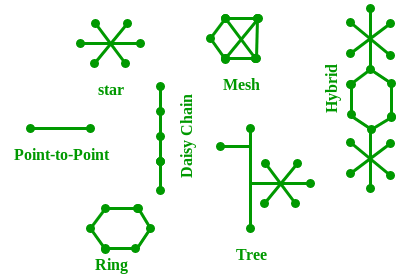
    The layout pattern using which devices are interconnected is called as network topology. Such as Bus, Star, Mesh, Ring, Daisy chain.
    Network-Topology-Diagram
    OSI:
    OSI stands for Open Systems Interconnection. It is a reference model that specifies standards for communications protocols and also the functionalities of each layer.
    Protocol: 
    Protocol is the set of rules or algorthims which define the way how two entities can communicate across the network and there exists different protocol defined at each layer of OSI model. Few of such protocols are TCP, IP, UDP, ARP, DHCP, FTP and so on.
    UNIQUE IDENTIFIERS OF NETWORK
    Host name:
    Each device in the network is associated with a unique device name known as Hostname.
    Type “hostname” in the command prompt and press ‘Enter’, this displays the hostname of your machine.


    IP Address (Internet Protocol address):
    Also know as Logical Address, is the network address of the system across the network.
    To identify each device in the world-wide web, Internet Assigned Numbers Authority (IANA) assigns IPV4 (Version 4) address as unique identifier for each device on the Internet.
    Length of the IP address is : 32-bits. (Hence we have 232 ip addresses available.)
    Type “ipconfig” in the command prompt and press ‘Enter’, this gives us the IP address of the device.
    MAC Address (Media Access Control address): 
    Also known as physical address, is the unique identifier of each host and is associated with the NIC (Network Interface Card).
    MAC address is assigned to the NIC at the time of manufacturing.
    Length of the MAC address is : 12-digit/ 6 bytes/ 48 bits
    Type “ipconfig/all” in the command prompt and press ‘Enter’, this gives us the MAC address.
    Port: 
    Port can be referred as logical channel through which data can be sent/received to an application. Any host may have multiple applications running, and each of this application is identified using the port number on which they are running on.
    Port number is a 16-bit integer, hence we have 216 ports available which are categorized as shown below:
    PORT TYPESRANGE
    Well known Ports0 – 1023
    Registered Ports1024 – 49151
    Ephemeral Ports49152 – 65535
    Number of ports: 65,536
    Range: 0 – 65535
    Type “netstat -a” in the command prompt and press ‘Enter’, this lists all the ports being used.
    Socket:
    The unique combination of IP address and Port number together are termed as Socket.
    Few more concepts
    DNS Server:
    DNS stands for Domain Name system.
    DNS is basically a server which translate web addresses or URL (ex: www.google.com) into their corresponding IP addresses. We don’t have to remember all the IP addresses of each and every website.
    The command ‘nslookup’ gives you the IP address of the domain you are looking for. This also provides the information of our DNS Server.
    ARP:
    ARP stands for Address Resolution Protocol.
    It is used to convert the IP address to its corresponding Physical Address(i.e.MAC Address).
    ARP is used by the Data Link Layer to identify the MAC address of the Receiver’s machine.
    RARP:
    RARP stands for Reverse Address Resolution Protocol.
    As the name suggest, it provides the IP address of the a device given physical address as input. But RARP has become obsolete since the time DHCP has come into picture.

    Circuit Switching VS Packet Switching

    CIRCUIT SWITCHINGPACKET SWITCHING
    In circuit switching there are 3 phases
    i) Connection Establishment.
    ii) Data Transfer.
    iii) Connection Released.
    In Packet switching directly data transfer takes place .
    In circuit switching, each data unit know the entire path address which is provided by the sourceIn Packet switching, each data unit just know the final destination address intermediate path is decided by the routers.
    In Circuit switching, data is processed at source system onlyIn Packet switching, data is processed at all intermediate node including source system.
    Delay between data units in circuit switching is uniform.Delay between data units in packet switching is not uniform.
    Resource reservation is the feature of circuit switching because path is fixed for data transmission.There is no resource reservation because bandwidth is shared among users.
    Circuit switching is more reliable.Packet switching is less reliable.
    Wastage of resources are more in Circuit SwitchingLess wastage of resources as compared to Circuit Switching

    TCP Connection Termination

                 In  TCP 3-way Handshake Process  we studied that how connection establish between client and server in Transmission Control P...